Karunya Plus Lottery Result: എല്ലാ വ്യാഴാഴ്ചയും കേരള സംസ്ഥാന ഭാഗ്യക്കുറി വകുപ്പ് നറുക്കെടുക്കുന്ന ലോട്ടറിയാണ് കാരുണ്യ പ്ലസ്. 50 രൂപയാണ് കാരുണ്യ പ്ലസ് ലോട്ടറിയുടെ ടിക്കറ്റ് വില. ഒന്നാം സമ്മാനം 1 കോടി രൂപയും, രണ്ടാം സമ്മാനം 50 ലക്ഷം രൂപയും മൂന്നാം സമ്മാനം 5 ലക്ഷം രൂപയുമാണ്. 5,000 രൂപയാണ് സമാശ്വാസ സമ്മാനം. എല്ലാ സംസ്ഥാന ലോട്ടറികളുടെയും ഒന്നാം സമ്മാനം 1 കോടിയാക്കി.
Karunya Plus Lottery KN-573 Draw Results (22 May 2025)22 May 2025
ഒന്നാം സമ്മാനം - ₹ 1 Crore
PG 307617Vaikkom
Tip: Enter the full ticket number or the last 4 digits of your ticket number.
Karunya Plus Lottery KN-573 Draw Results (22 May 2025)
ഒന്നാം സമ്മാനം ₹ 1 Crore
PG 307617 Vaikkom
സമാശ്വാസ സമ്മാനം ₹ 5,000
PA 307617
PB 307617
PC 307617
PD 307617
PE 307617
PF 307617
PH 307617
PJ 307617
PK 307617
PL 307617
PM 307617
രണ്ടാം സമ്മാനം ₹ 50 Lakh
PA 659784 Irinjalakuda
മൂന്നാം സമ്മാനം ₹ 5 Lakh
PA 394569
PB 244083
PC 518815
PD 540400
PE 192895
PF 409257
PG 670393
PH 811932
PJ 768370
PK 239251
PL 552780
PM 565731
തിരുവനന്തപുരം ബേക്കറി ജംങ്ഷന് സമീപമുള്ള ഗോർക്കി ഭവനിൽ വെച്ച് എല്ലാ വ്യാഴാഴ്ചയും ഉച്ചയ്ക്ക് 3 മണിക്കാണ് കാരുണ്യ പ്ലസ് ലോട്ടറിയുടെ നറുക്കെടുപ്പ്. 5,000 രൂപയിൽ താഴെ സമ്മാനം ലഭിച്ചവർക്ക് സംസ്ഥാനത്തെ ഏതു ലോട്ടറിക്കടയിൽ നിന്നും ഈ ടിക്കറ്റ് കൈമാറി പണം നേടാം. 5,000 രൂപയിൽ കൂടുതലുള്ള സമ്മാനം നേടിയാൽ ആ ടിക്കറ്റും തിരിച്ചറിയൽ രേഖകളുമായി ഭാഗ്യക്കുറി വകുപ്പിന് കീഴിലുള്ള ലോട്ടറി ഓഫീസിലോ ബാങ്കിലോ നേരിട്ടെത്തി പണം കൈപ്പറ്റാം. സമ്മാനാർഹമായ ടിക്കറ്റുകളുടെ വിശദവിവരങ്ങൾ ചുവടെ കാണാം.
അറിയിപ്പ് : കേരള സർക്കാരിന്റെ ഔദ്യോഗിക ലോട്ടറി വെബ്സൈറ്റിൽ നിന്നാണ് ഗുഡ്റിട്ടേൺസ് മലയാളം ലോട്ടറി നറുക്കെടുപ്പ് ഫലങ്ങൾ പ്രസിദ്ധീകരിക്കുന്നത്. നൽകിയിരിക്കുന്ന വിവരങ്ങളുടെ ആധികാരികത ഉറപ്പാക്കാൻ ഗുഡ്റിട്ടേൺസ് മലയാളം എല്ലാ ശ്രമങ്ങളും നടത്തിയിട്ടുണ്ട്. ഇതേസമയം, ഗ്രേനിയം ഇൻഫർമേഷൻ ടെക്നോളജീസ് പ്രൈവറ്റ് ലിമിറ്റഡും അതിന്റെ അനുബന്ധ സ്ഥാപനങ്ങളും മേൽപ്പറഞ്ഞ വിവരങ്ങളുടെ കൃത്യത ഉറപ്പുനൽകുന്നില്ല. നൽകിയിരിക്കുന്ന വിവരങ്ങളുടെ അടിസ്ഥാനത്തിൽ സംഭവിക്കുന്ന നഷ്ടങ്ങൾക്ക് ഗ്രേനിയം ഇൻഫർമേഷൻ ടെക്നോളജീസ് പ്രൈവറ്റ് ലിമിറ്റഡിനോ അതിന്റെ അനുബന്ധ സ്ഥാപനങ്ങൾക്കോ ഉത്തരവാദിത്വമില്ല.
Notifications
Settings
Clear Notifications
No New Notifications
Notifications
Use the toggle to switch on notifications
Block for 8 hours
Block for 12 hours
Block for 24 hours
Don't block
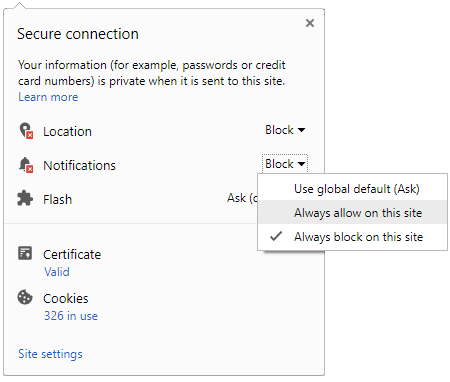
To start receiving timely alerts, as shown below click on the Green “lock” icon next to the address bar
Click it and Unblock the Notifications
Close X
Close X
To Start receiving timely alerts please follow the below steps:
Click on the Menu icon of the browser, it opens up a list of options.
Click on the “Options ”, it opens up the settings page,
Here click on the “Privacy & Security” options listed on the left hand side of the page.
Scroll down the page to the “Permission” section .
Here click on the “Settings” tab of the Notification option.
A pop up will open with all listed sites, select the option “ALLOW“, for the respective site under the status head to allow the notification.
Once the changes is done, click on the “Save Changes” option to save the changes.



 Click it and Unblock the Notifications

 Sign in with Google